Waiting for your channels to appear? IPTV activation time is usually shorter than the full setup, but the two are easy to confuse. TiviMate Pro Net subscriptions typically activate within 5-7 minutes. Treat that as an expected timeframe, not a guarantee.
Subscription activation and player-app setup are separate steps. Activation makes your IPTV access available; installing or licensing a player app is handled separately. Completing one step does not automatically complete the other.
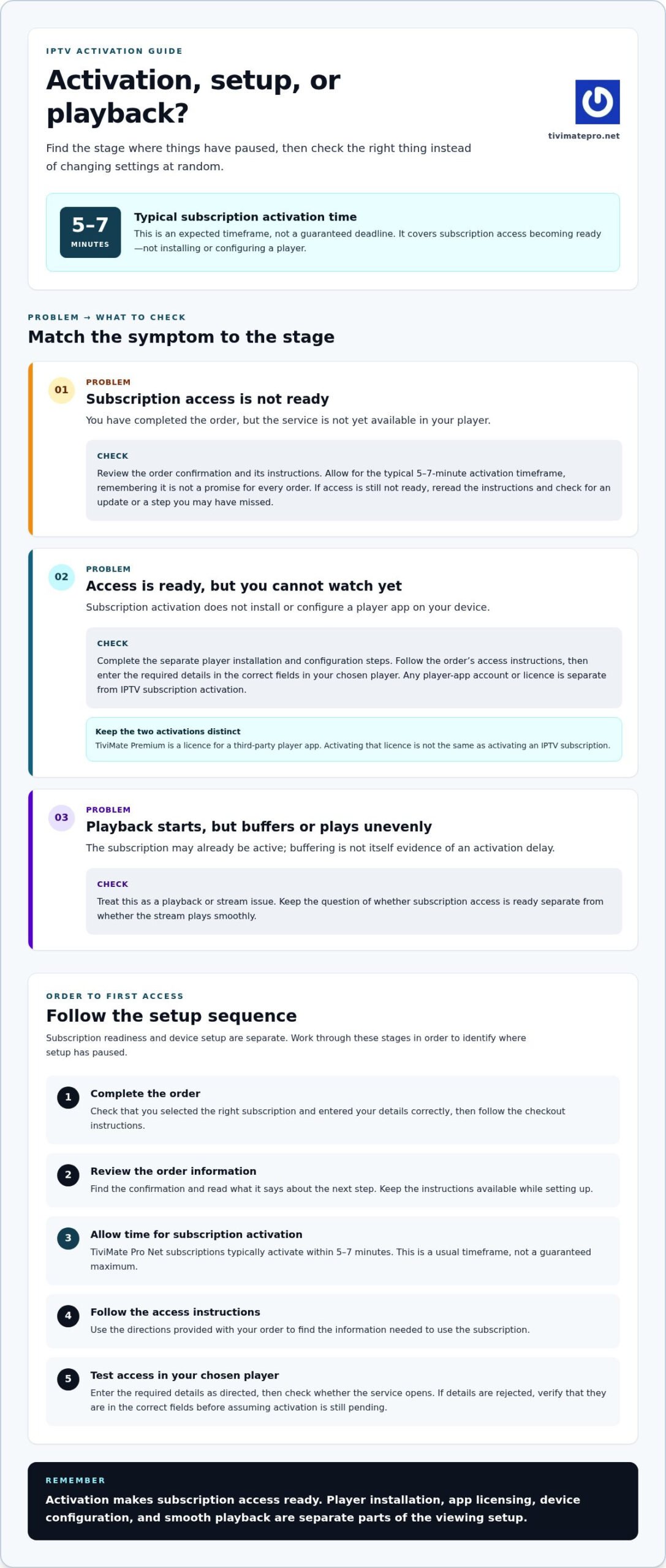
This guide explains what the 5-7-minute timeframe covers, what to check if access is not ready, and how to tell an activation delay from a device or playback issue. Follow the steps in order so you can identify where setup has paused without changing settings at random.
Key Takeaways
- IPTV activation time refers to when subscription access is ready, not the time needed to install and configure a player.
- TiviMate Pro Net subscriptions typically activate within 5-7 minutes, but this is not a guaranteed deadline.
- Follow the order instructions to find your access details and the next setup step.
- Check subscription access, device setup, internet connection and player configuration as separate things when troubleshooting.
What Does IPTV Activation Time Mean?
Subscription activation is when the IPTV access included with an order is ready to use. It does not mean every part of your viewing setup is complete. IPTV activation time refers to access becoming available, not the time it takes to install an app, configure a device or load a programme guide.
Quick definition: IPTV activation time is the period between completing a subscription order and the subscription access being ready to use. TiviMate Pro Net’s typical activation time is 5-7 minutes, but it is not a guaranteed timeframe for every order.
IPTV subscription activation versus player-app activation
Subscription activation makes the streaming service available through the access details provided for the subscription. Player-app activation is separate. It applies when an app requires its own account, licence or setup step.
The names can cause confusion. TiviMate Premium, for example, is a licence for a third-party IPTV player app. Activating that licence is not the same as activating an IPTV subscription. TiviMate Pro Net provides IPTV subscriptions, not the player app itself. Depending on your chosen player, you may need to complete both processes.
What does the activation timeframe cover?
The stated timeframe covers subscription readiness. It does not include downloading or installing a player, entering access details or configuring the app. Those tasks depend on your device and chosen player, so they can take additional time.
Activation time is not a measure of streaming quality. If the subscription is active but a stream buffers or plays unevenly, that points to playback conditions rather than activation. Keep the two questions separate: is the access ready, and does the stream play smoothly?
This distinction helps you decide what to check. If you have not installed a player, activation may be complete even though you cannot watch yet. If the app opens but rejects the access details, check that you entered them in the right fields before assuming activation is still pending.
Use this simple check:
- Access not ready: Review the order confirmation and instructions.
- Access ready, but not set up: Complete the separate player installation and configuration steps.
- Playback starts but buffers: Check the stream and playback setup rather than treating it as an activation delay.
Once you know which stage you are at, it is easier to choose the next check. The activation estimate tells you when access is typically ready. It does not promise that every app, device or stream will be configured and working within the same timeframe.
What Happens Between Ordering an IPTV Subscription and First Access?
The steps from order to viewing are straightforward, though subscription access and device setup are separate. TiviMate Pro Net’s typical IPTV activation time is 5-7 minutes. This is an estimate, not a guaranteed maximum, and it does not mean every setup task will be finished in that time.
A simple subscription activation sequence
Follow the instructions shown during checkout and with your order. Use the information provided for your purchase to see how to access the subscription and what to do next.
- Complete the order. Check that you selected the right subscription and entered your details correctly, then follow the instructions to finish the order.
- Review the order information. Find the confirmation and read any instructions about what happens next. Keep them available while setting up.
- Allow time for activation. TiviMate Pro Net’s typical IPTV activation time is 5-7 minutes. Treat this as a usual timeframe, not a promise that every order will be ready by a fixed point.
- Follow the access instructions. Use the directions provided with your order to find the information needed to use the subscription.
- Test subscription access. Enter the required details in your chosen player as directed, then check whether the service opens.
If access is not ready after the typical timeframe, do not immediately restart the process or place another order. Reread the order instructions and check for an update or step you may have missed. The next section covers common reasons for delays and how to distinguish them from setup issues.
Activation is not the same as full device setup
Subscription activation makes the service access ready. It does not install a player on your device or configure it for you. If you have not chosen and installed a compatible player, that remains a separate task. Any app licensing required by the player is separate too.
Entering access details is another step. The subscription may be ready, but you still need to open your chosen player and enter the details according to its instructions. An error at this stage does not automatically mean the subscription is still activating. Check that you are using the correct details in the correct fields.
Keep the sequence clear: complete the order, follow its instructions, confirm that subscription access is ready, then finish player setup and test playback. If you are comparing options before ordering, you can view IPTV subscription plans and choose a connection option that suits your needs.
Why Can IPTV Activation Take Longer Than Expected?
A typical timeframe is a guide, not a countdown or guaranteed maximum. TiviMate Pro Net subscriptions typically activate within 5-7 minutes, but order processing can vary. If access is not ready within that period, it does not automatically mean the order has failed. Start with the confirmation and instructions, then work out whether the issue is subscription access or a later setup step.
Is a short wait automatically a problem?
No. A brief wait beyond the typical IPTV activation time does not by itself show that anything has gone wrong. Check the order confirmation for the next step. Avoid submitting another payment or changing account details while you are unsure what is happening. Those actions will not tell you whether the original subscription is ready.
Use the order information as your reference. Confirm that you completed the displayed steps and look for instructions about accessing the subscription. If the instructions say to wait, allow some time before checking again. If they ask you to take an action, follow that direction rather than repeating earlier steps.
- Review the confirmation: Make sure the order is complete and read the instructions carefully.
- Check the stated next step: Follow the access directions provided with the order.
- Keep the timeframe in perspective: Five to seven minutes is typical, not a promise that access will be ready by then.
- Avoid duplicate actions: Do not place another order or make another payment simply because access has not appeared yet.
Activation delays versus playback problems
First, distinguish missing subscription access from trouble watching after access is available. If you have not received or entered the required details, focus on the order instructions. If the player accepts the details and opens the service but a stream buffers, the subscription may already be active. Buffering is a playback issue, not proof that activation is still pending.
Internet connectivity, device setup and player configuration can each affect playback. Check the basics: confirm the device is connected to the internet, make sure the player is installed and opened correctly, and look for typing errors in the access details. If an error message appears, note its exact wording. This can help distinguish an access problem from an app or connection issue.
- No access details yet: Recheck the confirmation and follow its instructions.
- Details rejected: Compare what you entered with the information provided.
- Service opens but playback stalls: Check the internet connection and player setup.
These checks help identify which stage needs attention, but they do not diagnose an account or promise a resolution time. Keep the order confirmation handy and avoid changing several settings at once. That makes it easier to see whether the issue concerns subscription access, the player or playback conditions.
What Should You Check While Waiting for IPTV Access?
Use a short checklist before changing settings or placing another order. Start with the order, then move on to the player and device once subscription access is ready. TiviMate Pro Net’s typical IPTV activation time is 5-7 minutes, but that is an estimate rather than a guaranteed maximum. Follow any specific next step in your order instructions.
A quick checklist before troubleshooting
- Confirm the order completed. Check the confirmation and review the instructions shown during checkout. Make sure you have not missed a required step.
- Allow for the typical timeframe. Give the order time to process. The 5-7-minute estimate describes typical activation, not a fixed deadline for every order.
- Review the access instructions. Use the directions provided with your order rather than assuming how or when access details will be provided.
- Check your player and device. If access is ready, confirm you have installed and opened a player that works with your device.
- Recheck entered details. Compare the access information with what you entered. Look for typing errors, extra spaces or details in the wrong field.
Keep each step separate. A player that is not installed can prevent you from testing the subscription even if access is available. An error in the player does not prove the order is still processing. Check one stage at a time to see where the problem begins.
If access is ready but content will not play
If the service opens but playback fails, check the device and connection before changing subscription details. See whether the problem affects every stream or only one. If just one stream fails, note that. If nothing plays, check the device’s internet connection and the player setup.
Keep troubleshooting focused:
- One stream has an issue: Try another item to see whether the problem is limited to that stream.
- No streams play: Check the device’s internet connection, then close and reopen the player.
- An access error appears: Re-enter the provided details carefully and check that each field contains the right information.
- The player will not open or respond: Treat this as a player or device setup issue, separate from subscription activation.
Buffering and missing subscription access are different problems. Avoid editing account or subscription details just because playback is uneven. Note what works, what does not and any error message. This makes your next troubleshooting step more specific without assuming a cause or a fixed resolution time.
To compare plans, view IPTV subscription options and follow the instructions provided with your order.
TiviMate Pro Net IPTV Activation: What to Expect
TiviMate Pro Net subscriptions typically activate within 5-7 minutes. This gives you a practical expectation after placing an order, but it is not a guaranteed completion time for every order. Follow the instructions shown with your purchase to find out when and how to check that subscription access is ready.
The stated activation timeframe
The 5-7-minute timeframe refers to subscription activation, meaning IPTV access is typically ready to use within that period. It does not promise that every part of your setup will be complete. You may still need to open a player, enter access details or finish a separate app setup step before watching.
Activation timing is different from streaming performance. A ready subscription does not guarantee that every stream will load or play in a particular way. If access is available but playback is not working as expected, check the player, device and internet connection separately. Keep the order instructions nearby to distinguish an access question from a setup issue.
Ready to explore a subscription?
TiviMate Pro Net offers IPTV subscriptions for live TV, live sports, movies and series, with an electronic programme guide (EPG), also known as a TV Guide. The service also offers a free 24-hour IPTV trial. The typical activation timeframe is 5-7 minutes, but this is not a promise of instant access or a particular streaming result.
Before choosing, consider how many device connections you need and follow the order instructions shown during purchase. When access details or next steps are available, use them to complete the subscription setup. Installing or configuring a player remains a separate part of getting ready to watch.
To compare the service and try it, explore IPTV subscription options and the free 24-hour trial.
Make Your Next Setup Step Simple
Before you begin, decide which screen you want to use and keep the order instructions handy. Follow each step in sequence, treating subscription access and player setup as separate tasks. If something does not work straight away, you can then identify which part needs attention without changing settings at random.
Knowing what IPTV activation time means also helps set a sensible expectation. It is the time for subscription access to become ready, not a promise that every device and app will be configured. A little preparation makes the move from ordering to setup clearer.
Ready to get started? Explore TiviMate Pro Net subscription options, including the free 24-hour trial, and follow the order instructions to guide your setup.
Frequently Asked Questions
How long does IPTV subscription activation usually take?
TiviMate Pro Net’s typical IPTV activation time is 5-7 minutes, but that is not a guarantee that every order will be ready at an exact minute. Follow the instructions shown with your order and check whether access is available. If it is not, note whether you are still waiting for access details or whether the player has shown an error. That distinction helps you choose the next check.
Does IPTV activation time include installing a player app?
Not necessarily. Subscription activation concerns access to the service; installing a player is a separate task. You can install a compatible player on your device while waiting, then use the order instructions to add subscription details when they are available. Some apps also have their own account or licence steps. Follow the app’s instructions for those, rather than using them to judge whether the subscription is active.
What should I do if my IPTV subscription is not active after a few minutes?
Check that the order completed and review its confirmation for next steps. Look for the access details or instructions, and allow for the typical timeframe without treating it as a firm deadline. If you have the details but playback fails, check the connection and player separately. Avoid placing another order or changing account details unless your order instructions say to.
Can I set up my IPTV player while subscription activation is processing?
Yes. You can prepare the player and device separately, as long as the setup is compatible and you follow the app’s guidance. For example, install the player and become familiar with its menus before entering subscription details. This will not activate the subscription or speed up its processing. When access is available, use the order instructions to complete the connection and test playback.
Does IPTV activation time affect streaming quality?
No. Activation describes when subscription access becomes available, while playback quality concerns how content runs on your setup. If a stream buffers, try another item to see whether the issue is limited to one stream. Then check the device’s internet connection and player setup. This helps you distinguish a playback problem from activation still being in progress.
Is activating an IPTV app the same as activating an IPTV subscription?
No. App activation enables a player or its licence; subscription activation makes the streaming service access available. Guides about activating a third-party player licence describe that app’s process, not necessarily the steps for an IPTV subscription. Check whether a guide refers to the player or the service so you do not mistake app-licence instructions for your order’s access steps.
Does the IPTV activation timer start when I pay or when I install the app?
Use the starting point described in your order instructions rather than assuming it begins at payment or app installation. Subscription activation and player setup are separate, so installing an app does not itself start or complete activation. Check your confirmation for the relevant order status and next step. If the instructions do not specify a start point, do not infer one from the player’s installation time.